Froth is a small live lexical language for programmable devices.
Froth is in pre-pre-pre alpha and in ongoing development. It was designed as a thesis project by Nikolai Kozak at the NYU ITP program.
You can get in contact with me at: nkozak [at] nyu [dot] edu.
Repos (again, a sort of primeval, but usable, soup at the moment):
Froth - Stable, ESP32 targeting.
Experimental rewrite - Ongoing rewrite, ATmega328P and other small profiles.
to pulse with pin, wait [
  gpio.high: pin;
  ms: wait;
  gpio.low: pin
]

to blink with pin [
  repeat 3 [
    pulse: pin, 75;
    ms: 75
  ]
]

blink: LED_BUILTIN
save
Why Froth?
We’re used to one major paradigm in embedded programming (think Arduino, etc.): code, compile, upload, and run. Once our program is on the microcontroller, it’s basically in a black box. You can’t really talk to it, inspect it, change it live.
Froth allows you to do just that: the microcontroller becomes a transparent system. You can redefine functions live, save your progress, read back the source code that’s on the device in a human-readable format, and much more. More importantly, the device is the computer.
You can do all of the above with nothing but a typewriter.
What this means is that you can code and explore an entire device without ever having to worry about a toolchain, or wonder what function is calling what - it’s all there, out in the open, for you to see.
The Froth language was designed to be as easy as possible within reason. It is drastically simpler than C, and much better suited to beginners, and to quick iteration sessions.
If none of this made sense: working with Froth kind of feels like p5.js but for hardware.
A conversation
In interactive mode (i.e. when connected to a device running Froth), Froth feels like this:
> gpio.output: LED_BUILTIN
ok
> led.on:
ok
> led.off:
ok
> 2 + 3
5
Of course, you can also program with files, on a normal editor.
What’s in the device?
Exploring what’s saved in the device is easy. To get a list of every function, you can simply type words:
> words
boot
led.on
led.off
led.blink
matrix.init
grid.set
demo.pong.run
...
If you’re curious about a given word (function), you can simply show it:
> show @led.blink
to led.blink with count, wait [ blink: led.pin, count, wait ]
Tracing a program.
When a Froth device starts up, it automatically executes the only special function in the language: the boot function. That means that if we take a look at boot, we can trace through what the code is actually doing.
> show @boot
to boot [
  demo.pong.setup:;
  demo.pong.run:
]
Here we see that boot calls demo.pong.setup and demo.pong.run. We can then show demo.pong.run, to get an idea of what the microcontroller is actually doing:
> show @demo.pong.run
to demo.pong.run [
  while (not joy.click?:) [
    demo.pong.frame:
  ]
]
That’s it! We now know what the microcontroller is running. This works even if the microcontroller wasn’t yours in the first place - it’s transparent, you can just “check it out”. Of course, it can be gated for security later on.
Redefining functions and variables live.
The nice thing about Froth is not just that you can see your source, but also that you can redefine it while the system is running. No compile, no waiting.
to led.blink with count, wait [
  repeat count [
    led.toggle:;
    ms: wait
  ]
]

led.blink: 6, 50
The redefinition is immediate, and all other words (functions) that depend on led.blink will point to the new version.
Saving.
And of course, none of this would be particularly useful if you weren’t able to save. With Froth, it’s as easy as executing save, and your function definitions, boot binding, etc. are all persisted in the device.
> save
ok
The more technical version of this story is on How Froth Is Different .
Language Capabilities Right Now
| Area | Released Froth | Experimental rewrite |
|---|---|---|
| Use today | ESP32 and POSIX host paths in the public v0.1.2 release | Active rewrite, not the public install path yet |
| Boards | esp32-devkit-v1, the Froth Machine, and a host target | ATmega328P pressure profiles, host profiles, and an ESP32 proof profile |
| Live work | connect, send, words, show, info, save, restore, dangerous.wipe | Serial/session work in progress |
| Language | Names, lexical locals, Code, conditionals, loops, text literals, cells, records, explicit persistence | Profile-gated versions of the same core ideas |
| Hardware | GPIO, LED, ADC, Machine display/input, I2C, UART, and LEDC on supported ESP32 boards | Board/platform glue in progress |
| C extension | Board FFI and project FFI through froth.toml | Not the public extension path yet |
Built For Real Boards
At the moment, Froth is only released for an ESP32 target. It is currently being updated and rewritten. An experimental rewrite with support for the ATmega328P, as well as more granular language profiles, can be found at:
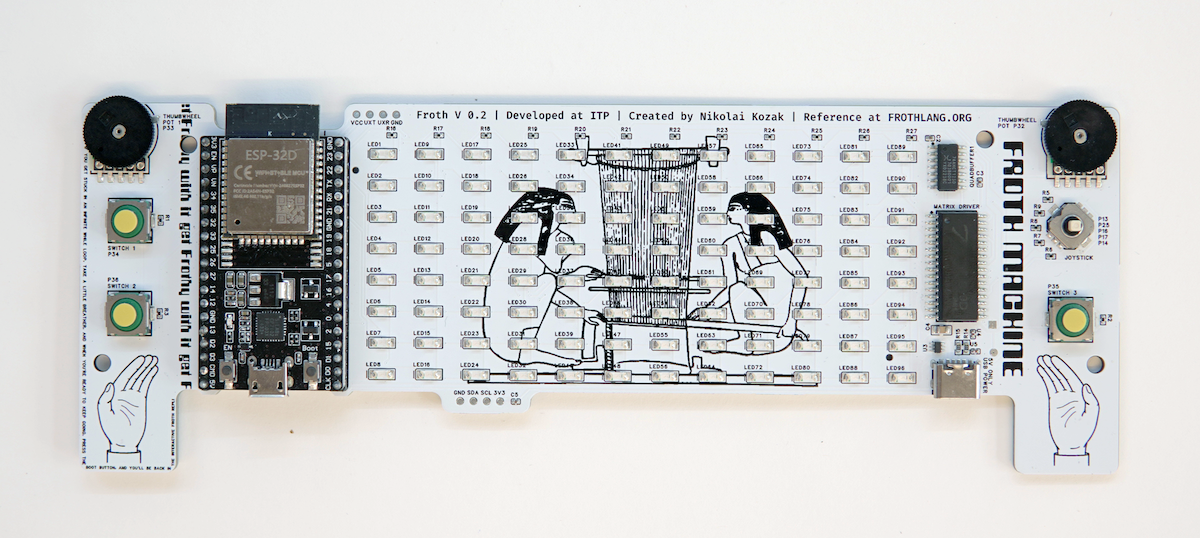
On this site, the protoboard introduced as the Froth Machine is covered. It was designed for a workshop at NYC Resistor, and I am actively using it to demonstrate Froth: the display, joystick, knobs, and small game-shaped workflow allow you to learn in a workshop without reading low-level board reference first.
Start Here
- Install Froth for the CLI, release archives, and editor extension.
- Read the guide for the language and workflow from first principles.
- Follow a tutorial when you want a task-shaped path.
- Explore the Machine for the Froth Machine board, its words, its controls, and its first games.
- Use the Workshop for the live puzzle activity, missions, quick reference, and troubleshooting.
- Use the reference when you need exact behavior or library surface details.
- Read how Froth is different for the deeper design context.